


Baby Food Tracker & BLW: Avo
4.37.00 Reviews
App Specs
- Version
- 3.7.3
- Updated On
- License
- Free
- Downloads
- 10,000+
- Developer
- LinaSoft
- Categories
- Parenting
- Platform
- Android
Screenshots
 Analysis by AppCompare
When I’m trying to remember which foods a baby has tasted and how they responded, the details can blur together quickly. Baby Food Tracker & BLW: Avo is designed to put those mealtime notes in one place, alongside ideas for introducing solids. I see its strongest use as a practical record for the everyday questions that come up during feeding—not as a substitute for a clinician’s advice or a family’s own approach.
Readability and navigation for tired parents
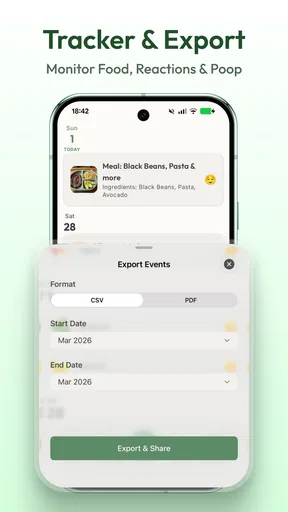
The appeal of a dedicated food tracker is focus: instead of searching through messages, paper notes, or a general-purpose notes app, I can keep feeding-related information together. That can make it easier to look back before offering a food again or to prepare a useful summary for a conversation with a pediatrician. In a parenting app, that simple purpose matters; a tool that demands lots of organizing can become one more task in an already busy day.
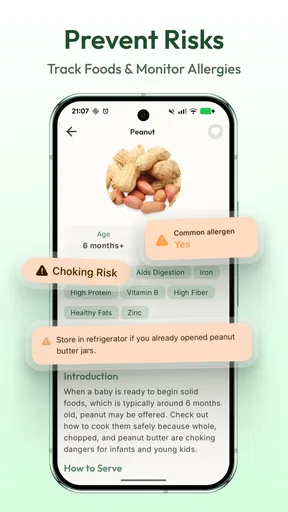
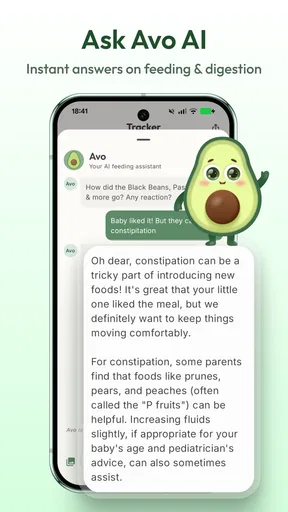
The published description presents Avo as a way to track baby food, allergies, and baby-led weaning. Those connected topics are a sensible fit, since a parent may want to remember both what was served and whether anything seemed unusual afterward. I would still treat any entry as a personal observation rather than a diagnosis: a log can help preserve details, but it cannot determine the cause of a reaction.
Motor and sensory considerations at mealtime
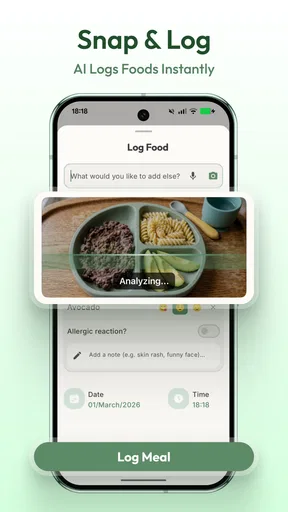
Feeding a baby often means having only one hand free, moving between the high chair and kitchen, or trying to record a note before the next part of the routine begins. My practical advice is to keep entries short and consistent. For example, record the food and the observation that matters, then add detail later if needed. That habit reduces the pressure to write a full account in the middle of a meal.
There is also a sensory side to using a tracker. If logging every bite starts to make meals feel like a test, I would scale the routine back to new foods or noteworthy responses. The most useful record is one a parent can maintain without turning feeding into paperwork. Families who prefer voice notes, larger text, or a particular screen-reader workflow should check the app on their own device before relying on it as their main record; ease of use can vary with personal needs and settings.
Using a food log across home and care settings
Avo may be especially useful when more than one adult helps feed the baby. A parent can use a consistent approach to note what was tried, then share the relevant information in conversation with a partner or caregiver. I would avoid assuming that everyone has access to the same record or that an entry automatically reaches another person. Agreeing on a simple handoff—what was served, when, and anything worth watching—can prevent gaps even when the app is only one part of the routine.
A realistic example is a parent preparing for a week of introducing solids while another caregiver handles a few meals. Rather than relying on memory at the end of the week, the parent can check their notes before planning what to offer next. This is a modest benefit, but it is exactly where a tracker can earn its place: by reducing repeated questions and making small details easier to retrieve.
Worth Reading Before You Choose

EA SPORTS FC Mobile 26 Is a Bigger Football Game, but It Takes Time

Flipboard Shows What News Apps Must Do Beyond the Feed

Switching to Android Auto Means Rethinking Your Driving Routine

Google Calendar Makes a Crowded Week Easier to Manage

Ludo King Makes the Most of the Minutes Between Plans

Baby Panda World Brings Quick Play to Modern Phones, but Its Game Library Feels Busy
Getting Started: First Impressions
Downloading Baby Food Tracker & BLW: Avo was a breeze. A quick search on the App Store, and I was ready to dive in. Right off the bat, the app's design struck me as super user-friendly. You know how some apps try to do everything and end up overwhelming you? This isn’t one of them. The clean interface is welcoming, and it feels like a breath of fresh air for sleep-deprived parents.
The setup process was straightforward. Avo lets you input your baby’s details like age and dietary preferences, making it feel personalized from the get-go. It’s like the app knew my baby better than I did!
Features: A Parent's Best Friend
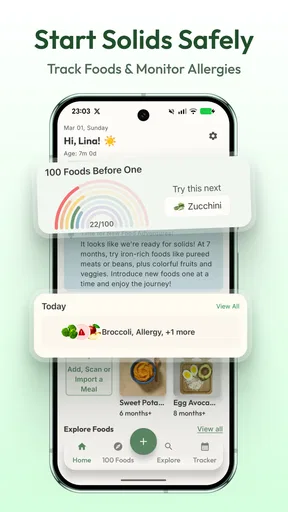
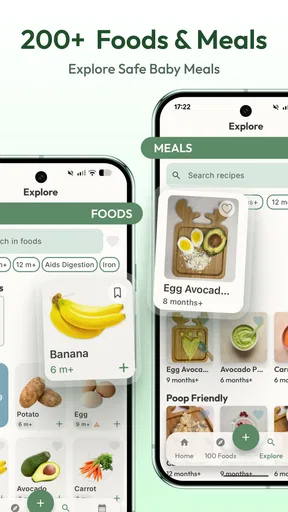
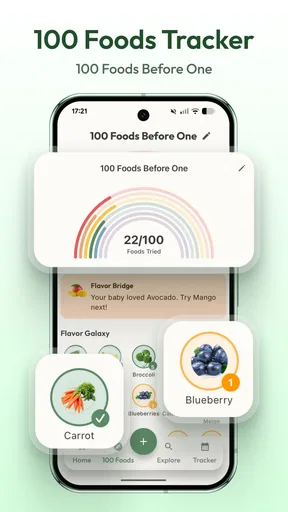
Once you're in, the features are where Avo really shines. You can track meals, log favorite foods, and even note any allergic reactions. It’s like carrying a little food diary in your pocket. There’s also a helpful section on Baby-Led Weaning (BLW), which gives tips and meal ideas. For new parents diving into BLW, this is a goldmine.
The app includes a recipe section that’s filled with nutritious and easy-to-make meals. Trust me, when you're running on three hours of sleep, "easy" is the magic word.
Making the log useful beyond the first week
For a record to stay helpful, I would choose a small set of details to capture every time. A simple pattern might be the food offered, whether the baby tasted it, and any observation the caregiver wants to remember. Keeping the same pattern makes entries easier to scan later than writing a different kind of note each day. It also helps separate a food being offered from a food being eaten, which are not always the same thing.
One non-obvious trade-off is that more tracking does not automatically mean better decisions. If the log becomes a reason to introduce foods on a schedule that does not suit the child, I would pause and follow the family’s healthcare guidance instead. Likewise, a note about a possible reaction is useful context to bring to a professional, not proof that a particular food caused it. The app’s value is in helping me remember, not in interpreting medical symptoms.
How it fits beside other parenting tools
Compared with a paper notebook, a phone-based tracker is easier to carry and may be quicker to check while planning meals. A notebook, however, can be simpler for a caregiver who dislikes apps or wants to write without unlocking a phone. A general notes app is flexible, but it can scatter food records among unrelated reminders unless the family is disciplined about using one dedicated note. Avo’s subject-specific focus is the main reason I would choose it over those alternatives.
It is not automatically the best choice for every household. If a family already has a reliable system shared between caregivers, adding another place to record meals may create duplication. And if the main need is clinical symptom tracking, parents should ask their healthcare provider what information to record and use the app only as a convenient personal aid. Its strongest fit is everyday organization around trying solids, not complex care coordination.
Who may benefit—and who may prefer another approach
I’d consider this app for a parent beginning solids, someone exploring baby-led weaning, or a caregiver who keeps forgetting which foods have already been offered. It can also help a family compare notes over time, provided everyone agrees on what to record. The food-and-reaction focus gives those observations a clearer home than a miscellaneous phone note.
I would be more cautious about recommending it to someone who finds frequent logging stressful, needs a highly customized accessibility setup, or expects a shared household record without checking how the app works for their situation. In those cases, a paper log or a tool already used by the whole care team may be the less frustrating option. The best tracker is the one that fits the family’s actual routine, rather than the one with the longest list of possible entries.
Why It's Worth Your Time
Now, I know what you’re thinking: "Do I really need another app on my phone?" If you’re a parent, the answer is a resounding yes. Avo isn’t just about tracking; it’s about peace of mind. Imagine never having to wonder when your baby last tried sweet potatoes or if they’ve ever had a reaction to peas. It keeps everything organized so you can focus on what really matters—spending time with your baby.
Another standout feature is the community aspect. The app connects you with other parents, offering a platform to share experiences and advice. It’s like a mini support group, right at your fingertips.
Practical points before you settle in
Avo is a free parenting app from LinaSoft, with optional in-app purchases ranging from $2.99 to $19.99 per item. Its average rating is 4.4 from 304 ratings, and it has 10K+ installs. Those figures suggest that other families are using it, though I would put more weight on whether its tracking style suits your household than on popularity alone. The app is rated for Everyone, and the current version is 3.4.5.
Before building a routine around it, I would check that the app runs on your device and try a few entries with foods you already know. That gives you a chance to see whether the layout and amount of detail feel manageable before you depend on it during a busy feeding period. The app is free to start, while optional purchases mean it is worth checking what is included before paying for anything.
For families wondering whether this is only for baby-led weaning, its focus on food tracking can still be relevant if solids are introduced in another way. The useful question is whether the app’s meal notes and guidance match your approach. If you want a general baby journal covering sleep, appointments, and other routines, a broader parenting tool may be a better fit; Avo is more appealing when feeding is the particular task you want to organize.
Wrapping It Up
Baby Food Tracker & BLW: Avo isn’t just an app; it’s like having a digital assistant for your baby's meals. It simplifies tracking and planning, turning what used to be a daunting task into something manageable. Whether you're new to parenting or a seasoned pro, Avo offers something valuable. Plus, it’s free to download, so there’s no harm in giving it a whirl.
In a world where every moment counts, Avo frees up your time and sanity. So, if you’re ready to make feeding time less about stress and more about fun, this app might just become your new best friend. Happy parenting!
A considerate fit, with realistic expectations
My inclusive verdict is that a focused food diary can support different family routines when its entries remain quick, its purpose is clear, and caregivers treat it as a memory aid rather than an authority. I would try it if I wanted one place for solids-related notes and ideas, and keep the record deliberately lightweight. If the screen experience does not work comfortably for you, or recording food adds pressure instead of easing it, choosing a notebook or another familiar method is entirely reasonable.
For me, the strongest reason to use Avo is not that it promises to solve feeding decisions; it is that a small, consistent record can make those decisions easier to discuss and plan. That is a useful, grounded role for a parenting app—and a good standard to use when deciding whether it belongs in your daily routine.
Pros
- User-friendly interface for easy navigation.
- Comprehensive tracking of baby's meals.
- Includes recipes and meal ideas.
- Tracks allergies and dietary preferences.
- Syncs data across multiple devices.
Cons
- Limited free features in the basic version.
- No offline mode for tracking.
- Ads can be intrusive at times.
- Requires account creation to use.
- Some features need a premium subscription.
FAQs for Baby Food Tracker & BLW: Avo
What is Baby Food Tracker & BLW: Avo?
Baby Food Tracker & BLW: Avo is a comprehensive app designed to assist parents with tracking their baby's food intake and progress, especially for those practicing Baby-Led Weaning (BLW). It offers features like meal logging, nutritional guidance, and developmental milestones to ensure a balanced diet and healthy growth.
How does Baby-Led Weaning (BLW) work in this app?
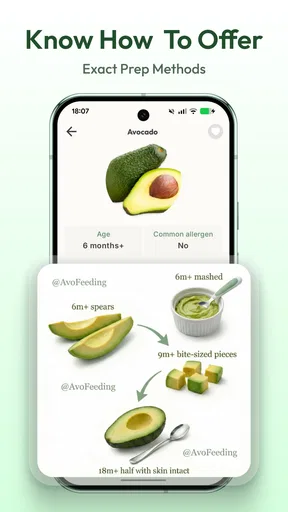
The app supports Baby-Led Weaning by allowing parents to record foods introduced to their baby, track reactions, and schedule meals. It provides guidance on safe food options and offers recipes suitable for BLW, helping parents ensure their baby experiences a variety of textures and flavors safely.
Is Baby Food Tracker & BLW: Avo free to use?
While the app offers a range of free features, there may be premium options available for purchase. These can include advanced tracking tools, exclusive recipes, or personalized meal plans. Users should check the app's store page for detailed pricing information and available in-app purchases.
Can I use the app for multiple children?
Yes, Baby Food Tracker & BLW: Avo allows parents to track food intake and progress for multiple children. It provides separate profiles for each child, enabling personalized tracking and analysis, which is especially useful for families with twins or siblings close in age.
Is the app available on both Android and iOS?
Yes, Baby Food Tracker & BLW: Avo is available for download on both Android and iOS platforms. Users can find it on the Google Play Store and the Apple App Store, ensuring accessibility for a wide range of smartphone users.


